rsvpBOOK.com delivers a simple-to-use,
online event registration service to event organizers
and planners who hold any type of event, workshop,
webinar, or training classes at an affordable
price. From simple meetings to multi-day conferences,
our robust list of features will allow you to
quickly and easily present your registrants
with a professional registration website.
There are no contracts nor hidden charges
or surprises. There are no support or maintenance fees and
no per-registrant fees. We publish our Pricing.
Our TRY BEFORE
YOU BUY policy enables you to
set up your online event registration
website and try it out before making
a purchase.
If
you hold multiple events per year,
manage multiple event organizers,
and require centralized registrant
data management, then have a look
at our Pro Edition product.
Our event registration website consists of a
registration page, email confirmation, email invitations,
thank you for registering page and numerous support
pages
Create, customize, edit and manage your own
event registration website
More than 30 design themes from which to choose
or use your own
Easily create your registration website by filling
in simple forms – there’s no software
to install
Brand your registration site with your company’s
logo
Set your desired maximum number of registrants
- be notified as the maximum approaches
Registrants can securely edit their event registration
information themselves (with a password)
Enter event descriptions, maps and driving directions
with WYSIWYG editors
Your event registration website is aesthetically
pleasing and does not display 3rd party ads
We provide buttons and link code so that you
can easily link to your event registration page
from your company or organization's website
Your event website comes with a unique URL,
no login is required to register
Most text fields support HTML entries for customization
of your website's look and feel
Copy any event when creating a new event –
a major time saver when planning multiple or recurring
events
Specify your event's timezone for worldwide
registrations
Registrant Information
Standard capture fields are name, email address,
title, company, mailing address, telephone
Capture information can be customized by adding
new fields and removing unwanted fields
Connect your registration page to your SalesForce.com™
account - automatically create leads upon every
registration
Required fields can be changed to un-required
and vice-versa
All standard and customized fields can be added
to custom reports
Badge and Label Maker - print registrant data,
custom text and add graphics to standard Avery™
labels
Email Messaging
Send personalized e-mail invitations to your
contact list (include first & last name plus
more)
Send reminders to attend and custom messages
to your registrant list and individual sessions
separately
Send reminders to make payment to unconfirmed
purchases
Send Post-Event surveys to attendees, no-shows
and registered-but-did-not-attends
Change the From: and Reply-To email addresses
to avoid firewall redirects to spam folders as
well as for vanity requirements
Use Email History to track who opened your messages
and who clicked-through
Import addresses from your AOL, Outlook, Outlook
Express, Gmail, or Yahoo address books
Resend invitations to addresses not yet registered
Automatic e-mail confirmations and payment receipts
are sent to your registrants
Option to receive an email message each time
someone registers for your event
Receive notification when you approach your
maximum number of registrants
Receive a cell phone text message with your
current attendee counts on selected days
Standard and Custom Reports
View and download Excel-import-ready registrant
information using standard reports
Custom reports can be filtered, column order
set, data pulled from question responses, sessions
and sales information, toggle ascending/descending
sort order, set date range)
Downloaded custom reports import easily into
any spreadsheet program via a .CSV file
Easily share custom reports with colleagues
and vendors; no login is required to see shared
reports - useful for caterers, bus drivers, rooming
lists
Online Payment Processing with Reporting
Accept online credit card payments: use your
PayPal account, connect directly to your own merchant
account or use rsvpBOOK
Define alternative methods of payment, such
as: pay-at-the-door, PO, mail-in company check
View and download sales by item, group and customer
View transaction data for any date range
Set up Promotional Codes for VIPs or for tracking
your advertising
Offer Early Bird discounts and manage inventory
per item
Set Start and Stop selling dates per item
Sessions / Tracks with Reporting
Set up an unlimited number of sessions - sessions
can be classes, workshops, tracks, a locations,
a date - many options for organizing using Groups
Copy sessions to quickly create similar sessions
with a different detail or two
Automatically ell tickets to session attendees
- sessions are assigned to a sales item - each
session can have a different price
Signing up for a sellable session automatically
increments the shopping cart
Organize multiple sessions into Groups, such
as a Morning Group and an Afternoon Group or a
Phoenix Group and a San Francisco Group or a July
Group and an August Group
Specify whether or not attendance is required
at the group level and/or the session level
Easily specify all session details (topic and
description, speaker, location, room, dates, times,
audience, focus, level)
View and download attendee lists - import (.CSV)
directly into your spreadsheet software
Send reminders to session attendees
Set maximum number of attendees per session,
with wait-list enabled or disabled
Easily move wait-listed attendees to the inlist
when an opening arises
Move attendees from one session to another and
we will let them know with an automatic e-mail
confirmation
Send Post-Event Surveys to a single session
or group of sessions
Print out session schedules, one page per registrant
- hand them out at the door
Registrant Questionnaire with Reporting
Capture additional registrant information using
customized questions you create (no limits)
Add conditional logic questions: display alternative
questions depending upon the answer selected.
Specify whether or not responses are required
Specify response format: text field, text area
field, radio button, checkbox, dropdown list and
None - for a section divider
Reorder the list of questions
View respons reports by question and by registrant
Easily export the responses to any spreadsheet
program
Create custom reports of responses for vendors,
such as caterer, hotel, room lists
Optional Post-Event Services
Create and send Post-Event surveys to selectable
groups of registrants and no-shows
Email tracking reveals who opened your survey
and then who clicked-through to the survey
Members
Members can manage multiple events from one
screen
Membership is free
Assign different coordinators to manage each
of your events - three logins per event are possible
Use QuickStats to monitor your attendee counts
from your Google home page
We offer a 33% Discount for .ORG and .EDU customers
- please call 1-888-933-8484 or email
At rsvpBOOK.com you pay for the functionality
you need -- one event at a time. There are no
contracts to sign. There are no hidden charges
or surprises. We publish our Pricing.
There are no support or maintenance fees and no
per-registrant fees.
Volume pricing is available - just ask
No per-registrant fees unless you use the Sales
Wizard - credit card processing fees may apply
Zero cost: Take advantage of our TRY BEFORE
YOU BUY policy - create and preview your registration
website before you purchase, even register yourself
to see the email messaging and reports
Corporate Event Planners
For companies who require a 100%, your-company-branded
event registration website, editorial and budget
control as well as centralized attendee registration
data management, then set up your company's entire
online event registration system using rsvpBOOK
Pro Edition (this link will open in a new
window). To your customers, rsvpBOOK is invisible
Pro Edition Standard and Pro Edition
Corporate are specifically designed for
corporate, business, non-profit, educational
and independent event planners who hold and
manage multiple events annually. Pro Edition
Corporate wraps your brand around all
event web pages and email communications;
rsvpBOOK
is invisible.
Rollover
centralize event
reporting and data management
manage multiple
event planners and organizers
simplify online
registration processes
reduce registration
costs
capture registrations
under your company brand and domain name
In addition to all of the Pro Edition functionality, Pro Edition Corporate wraps your company's branding around all customer-facing event registration web pages and email communications.
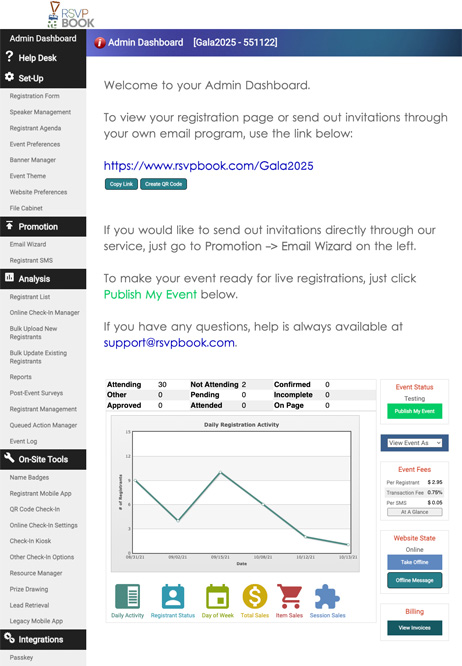
Below is your rsvpBOOKPro Edition Dashboard: manage your entire organization's event registration process from one executive screen.