Lead Retrieval Your Exhibitors Will Actually Use

Turn attendee badges into qualified, follow-up-ready leads using the phones your exhibitors already carry—while your event team controls access, packaging and reporting from one platform.
Badge & QR scanningCustom qualifiersStaff notesCompany lead portalCSV exportsWebhooks & automation
One program. Three audiences.

Make Lead Retrieval easier for the organizer, the exhibitor and the person standing in the booth.

The best lead-retrieval program should not require a separate hardware operation or force exhibitors to wait until after the show to understand what they captured.

For the organizer

Control which companies receive Lead Retrieval and how it is packaged with the event.

  • Offer it as an add-on or include it with selected booth packages
  • Keep company, booth and staff access connected
  • Monitor adoption and lead activity across the show
  • Use the same platform for related event operations when needed

For the exhibitor

Give each company a usable lead workflow instead of a raw list of scans.

  • See captured leads during the event
  • Use company-specific qualification questions
  • Keep notes and ratings with the lead
  • Export clean follow-up data

For booth staff

Keep capture fast enough for a real booth conversation.

  • Scan attendee badges from supported mobile devices
  • Add notes, ratings and qualifiers immediately
  • Share leads across authorized company staff
  • Use manual entry when a scan is not appropriate
The show-floor workflow

From badge scan to sales follow-up in seconds.

Lead Retrieval should capture the context of the conversation—not just the attendee identifier.

1

Scan

Authorized booth staff scan the attendee's event badge with a supported mobile device.

2

Qualify

Ask the questions that matter to that exhibitor: product interest, buying timeline, contact preference and more.

3

Add context

Attach ratings and notes while the conversation is still fresh so follow-up teams know what happened.

4

Follow up

Review, export or pass lead data into downstream workflows through supported integrations and webhooks.

No scanner rental desk required

Your exhibitors already have the hardware.

Dedicated scanners can add inventory, pickup, return and support logistics to an already busy show floor. rsvpBOOK is designed around authorized booth staff using supported mobile devices they already carry.

Mobile badge scanning
Multiple booth staff
Manual lead entry
Shared company lead list
Notes and qualification
Real-time organizer visibility
rsvpBOOK mobile lead capture workflow
Package it your way

Make Lead Retrieval part of the exhibitor offering.

Lead Retrieval does not have to be a separate operational project. Offer it directly to participating companies, include it with selected booth packages, or make it part of a broader exhibitor program.

Exhibitor add-onOffer Lead Retrieval separatelyOrganizer controls the retail offer
Premium booth packageInclude Lead RetrievalAccess follows the package
Show-wide benefitEnable all participating companiesOne consistent workflow
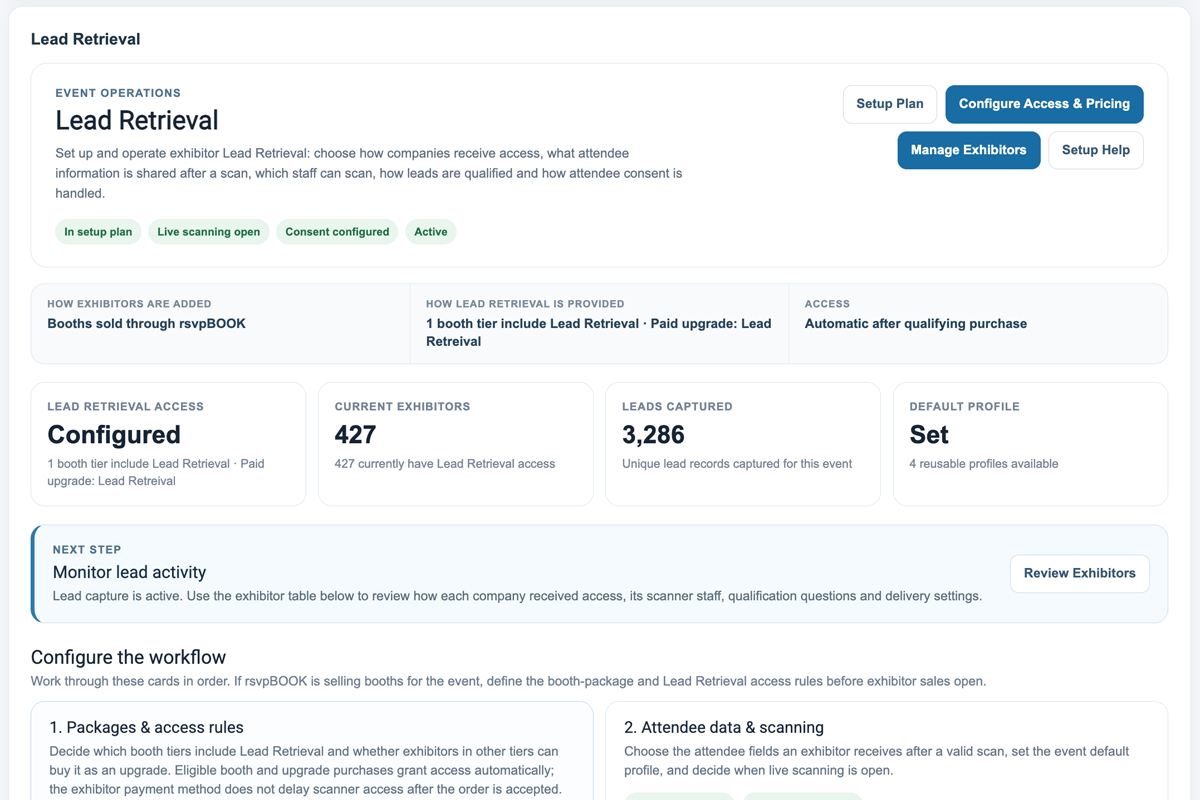
SCREENSHOT TO CAPTURE: Exhibitor package / Lead Retrieval setup
Capture the organizer view where Lead Retrieval is enabled for an exhibitor package or attached to the appropriate sales offering. Ideally show the booth/package name, Lead Retrieval inclusion and the clean organizer-facing controls—not private billing/rebate settings.
Suggested crop: 1200 × 800 landscape
Capture more than contact information

A scan becomes useful when it includes why the attendee mattered.

Each exhibitor can turn a badge scan into structured sales context instead of handing its follow-up team a spreadsheet of names with no memory of the conversation.

Product interestWhich product or service are you evaluating?
Buying timelineNow · 1–3 months · 3–6 months · Researching
Lead qualityHot · Warm · Follow-up · Not qualified
Contact preferenceEmail · Phone · Schedule a meeting
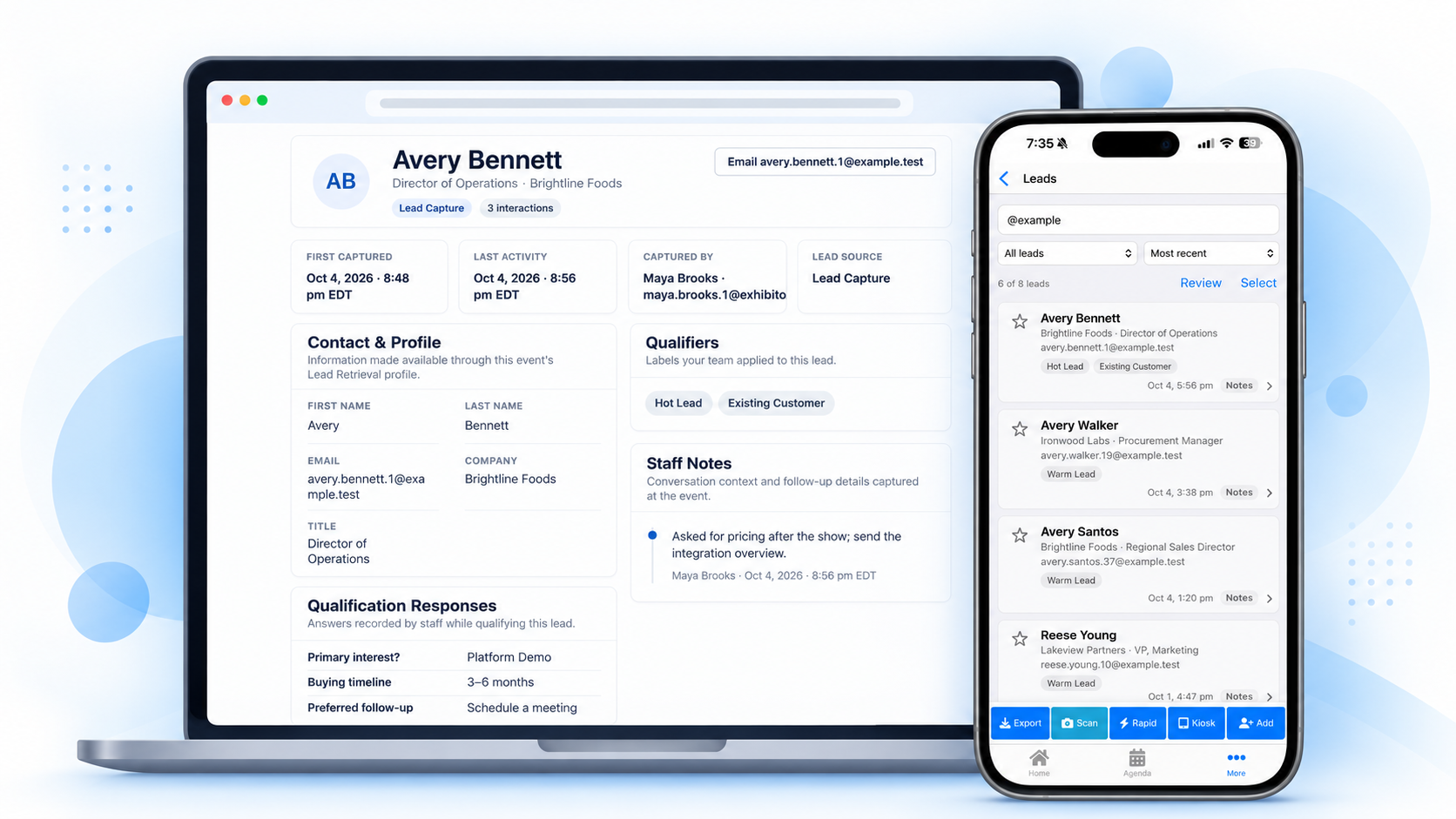
SCREENSHOT TO CAPTURE: Lead qualification carousel
Capture a phone-sized view showing one captured lead with qualification questions, rating/temperature, notes and contact preference. Use realistic sample data rather than lorem ipsum.
Suggested crop: phone portrait + 1 adjacent screen if useful
A real exhibitor lead portal

Give every participating company its own lead command center.

Exhibitors should be able to understand what their team captured without waiting for the event organizer to prepare a file after the show.

Total and unique leads
Hot/qualified lead counts
Individual lead details
Qualification responses
Staff activity
CSV export
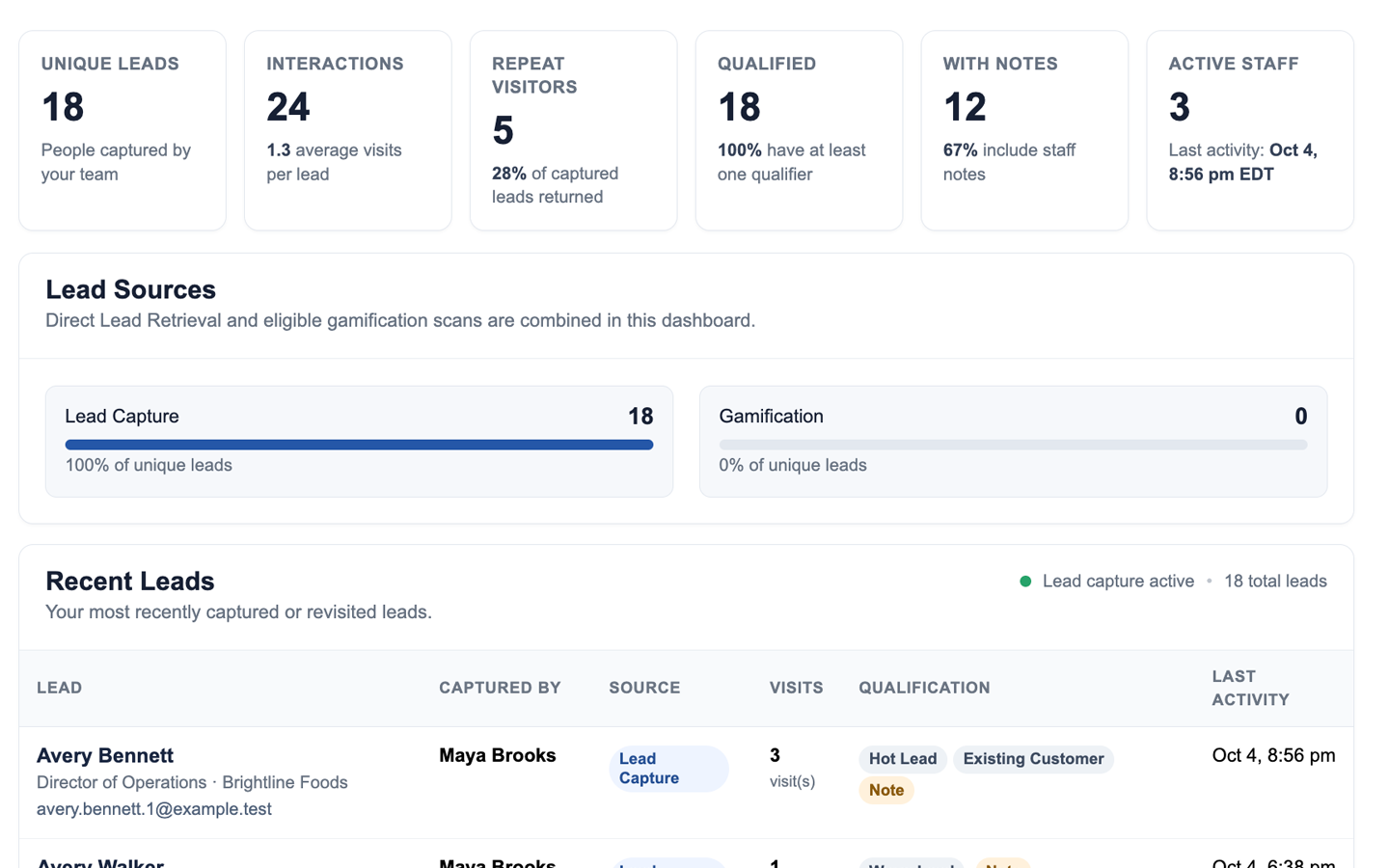
SCREENSHOT TO CAPTURE: Exhibitor Lead Portal dashboard
Capture the company-facing dashboard showing lead totals, unique/hot leads, staff activity or charts, and the export/report controls. Prefer a populated event so the portal looks active rather than empty.
Suggested crop: 1440 × 900 desktop
Lead Retrieval first. Broader event platform when you need it.

Start with the problem that brought you here.

Some organizers come to rsvpBOOK because they need registration. Others need exhibitor Lead Retrieval first. You do not have to make a full platform replacement the first buying decision. When the event needs more, the same company and attendee workflow can connect to the rest of rsvpBOOK.

Registration
Companies & Exhibitors
Booth Packages
Floor Plans
Meetings
Mobile App
Gamification
Event Reporting

See how interactive booth maps, multiple floor plans and booth packages connect to the exhibitor program →

Already committed to another registration platform? See the organizer-first deployment model →

Organizer setup

Set up the show without wiring unrelated systems together.

rsvpBOOK connects Lead Retrieval to the company, booth and event records that already define the show. That gives the organizer one place to see what is configured, what is still pending and which companies have access.

Companies & Exhibitors
Multiple floor plans
Booth packages and assignments
Lead Retrieval access
Attendee badge data
Control Center readiness

Explore interactive exhibitor floor plans and booth sales →

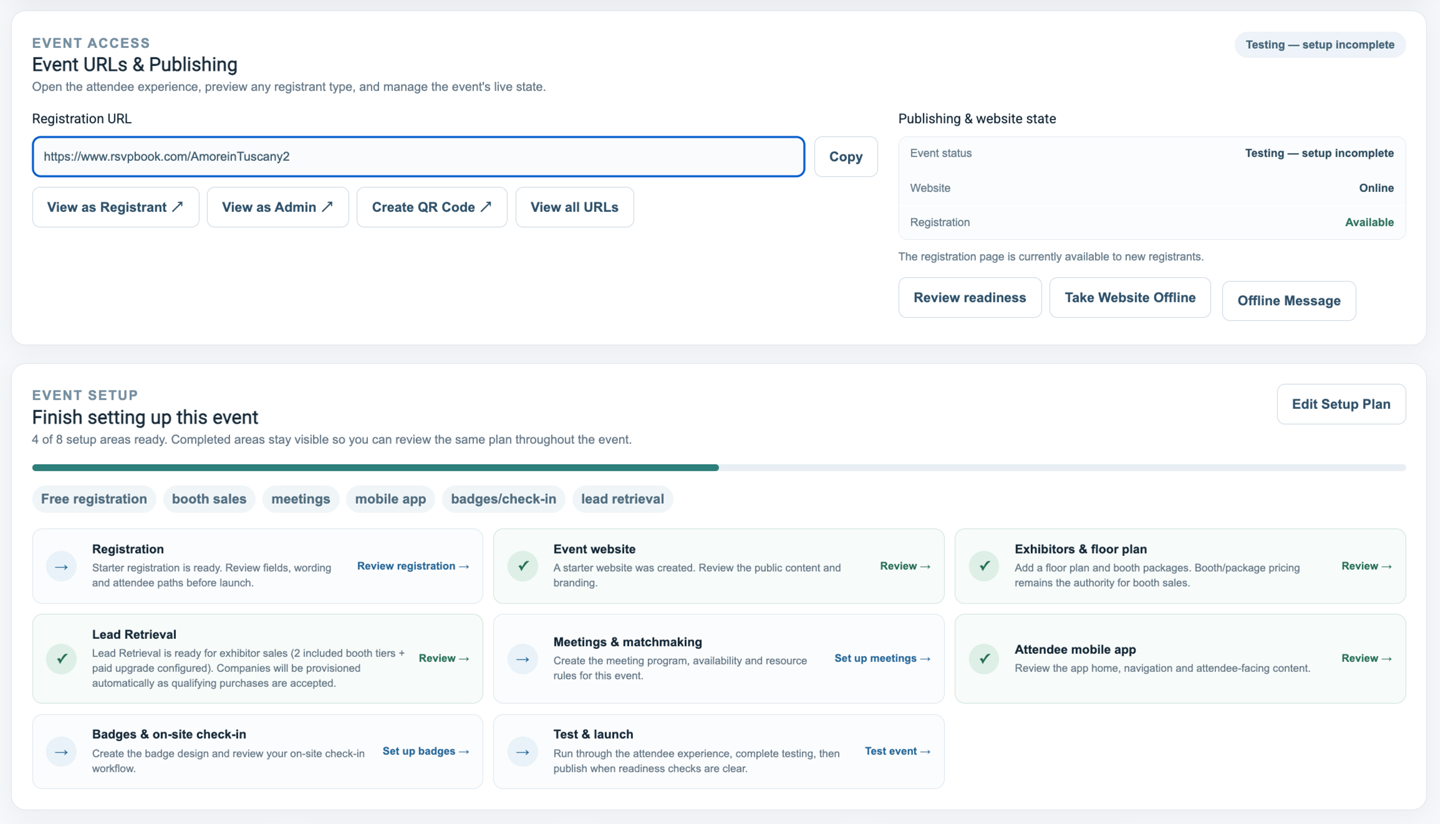
SCREENSHOT TO CAPTURE: New Control Center with exhibitor tasks
Create or use a demo event that planned Exhibitors/Floor Plan + Lead Retrieval. Capture the Control Center showing the event setup/readiness cards, ideally with one or two exhibitor-related items pending and others complete.
Suggested crop: 1440 × 900 desktop
A concrete event scenario

What this looks like for a 75-exhibitor conference.

The technology should disappear into the event workflow instead of becoming a project of its own.

Before the show

The organizer loads companies, defines who receives Lead Retrieval and communicates booth-staff access.

At the show

Authorized staff scan badges, answer qualification questions and add notes as conversations happen.

During the show

Company admins can see lead activity instead of waiting for a post-event scanner file.

After the show

Each participating exhibitor leaves with organized lead data ready for follow-up.

Proof belongs here

Show prospects that this runs in the real world.

The page is now structured to support stronger proof as Lead Retrieval production volume grows.

PROOF PLACEHOLDER: Organizer quote
Capture a short quote from an organizer about exhibitor adoption, ease of setup or reduced scanner logistics. Include name/title/company only when approved.
PROOF PLACEHOLDER: Lead activity metric
Use a defensible real metric such as exhibitors enabled, leads captured, average scans per active booth or percentage of participating exhibitors using Lead Retrieval.
PROOF PLACEHOLDER: Exhibitor quote
Use a quote focused on fast scanning, qualification, lead access or follow-up quality. An anonymized quote is still better than invented proof.
Common questions

What organizers usually want to know before they change Lead Retrieval.

Do exhibitors need dedicated scanner hardware?

No. Authorized booth staff can use supported mobile devices for badge scanning, which removes the need to make dedicated scanner rentals the center of the workflow.

Do attendees need to install an app?

No attendee app installation is required simply for an exhibitor to scan the attendee's event badge. The attendee identifier on the badge connects the scan to the event data the organizer has authorized for Lead Retrieval.

Can multiple booth staff capture leads?

Yes. Multiple authorized staff members can capture leads for the same participating company, with activity flowing into the company's lead workflow.

Can each exhibitor use its own qualification questions?

Yes. Exhibitors can collect the sales context they care about—questions, ratings, notes and follow-up information—without changing the event's underlying attendee record.

Can Lead Retrieval be included with booth packages?

Yes. Organizers can offer Lead Retrieval as a separate exhibitor add-on or include it with selected booth packages.

How do exhibitors receive their leads?

Participating companies can review their lead activity in the exhibitor workflow and export organized lead data for follow-up. Supported automation and webhook options can also feed downstream systems.

Do we have to move event registration to rsvpBOOK first?

Not necessarily. If registration is already committed elsewhere, rsvpBOOK can be evaluated around the Lead Retrieval requirement first. The practical integration path depends on the attendee and badge data available from the current registration provider.

Can we add more of the event platform later?

Yes. Lead Retrieval can be the first rsvpBOOK service you deploy. Companies, booth maps, registration, meetings, gamification and other event workflows can be connected as the event needs them.

Planning Lead Retrieval for an upcoming show?

See exactly how it would work for your event.

Bring your exhibitor count, event timing and current registration/badge setup. We will walk through exhibitor access, scanning, qualification, lead delivery and how Lead Retrieval would fit into your existing event workflow.

Give exhibitors a Lead Retrieval program worth using

Show us the event you are planning and we will walk through badge scanning, exhibitor access, qualification, exports and the organizer workflow around it.